Every week, I filter through everything Microsoft ships on Azure Logic Apps, AI Agents, API Management, Copilot Studio, and the broader Integration Platform — and surface only what working professionals actually need to know and act on. No press releases. No marketing fluff. Just the signal.
This week’s Signal – Gautam’s Take
APIM crossed from AI Gateway experiment into enterprise production control plane this week — and A2A just completed the multi-agent stack.
Three MCP governance capabilities shipped in Azure API Management: native OAuth 2.1 support for MCP servers (scoped token-based auth rather than just API keys), notifications/tools/list_changed events (agents can refresh their tool catalog dynamically without reconnecting), and MCP runtime telemetry (every tool invocation now emits latency, outcomes, and error signals). These aren’t incremental — they’re the missing pieces that make MCP viable in regulated enterprise environments. APIM can now govern a fleet of MCP servers the same way it governs a fleet of REST APIs: authentication, rate-limiting, audit trail, and observability in one layer.
The March 15 deadlines landed in the same week and frame the same story. Trusted Service Connectivity is now retired — if your APIM gateway calls Azure Storage, Key Vault, Service Bus, Event Hubs, or Container Registry without explicit credentials, those calls are failing. And new service limits are now in effect for Consumption, Developer, and Basic tiers. If you haven’t checked either of these yet, check today before investigating anything else.
The second major story is A2A (Agent2Agent) protocol, now in public preview in Copilot Studio. MCP defines how agents call tools; A2A defines how agents call other agents. With both now available in Microsoft’s stack, the full multi-agent architecture pattern is complete: a Copilot Studio agent can trigger a Logic Apps MCP tool for deterministic integration work, and separately delegate a sub-task to a Semantic Kernel agent, a LangChain agent, or any A2A endpoint — framework-agnostic, with explicit auth. Logic Apps provides the tool layer (MCP) → Copilot Studio orchestrates agents (A2A) → APIM provides the governance layer (OAuth, rate-limiting, telemetry). Your integration platform isn’t just modernising — it’s becoming the foundation everything else runs on.
AI + Integration
APIM as the Production MCP Gateway: The Governance Stack Is Now Complete
With OAuth 2.1, tools/list_changed events, and runtime telemetry all shipping this week, Azure API Management has reached the maturity level enterprises need to put MCP in production. The full governance stack is: Logic Apps Standard (workflow + connector tool logic) → APIM (OAuth auth, rate-limiting, policy enforcement, telemetry) → Entra ID (token issuance + identity). Every enterprise AI agent tool call now has a clear, observable, policy-governed path from agent to backend. This is what the MCP-in-production conversation looks like in 2026.
Azure Logic Apps Connectors as MCP Tools in Microsoft Foundry (Public Preview)
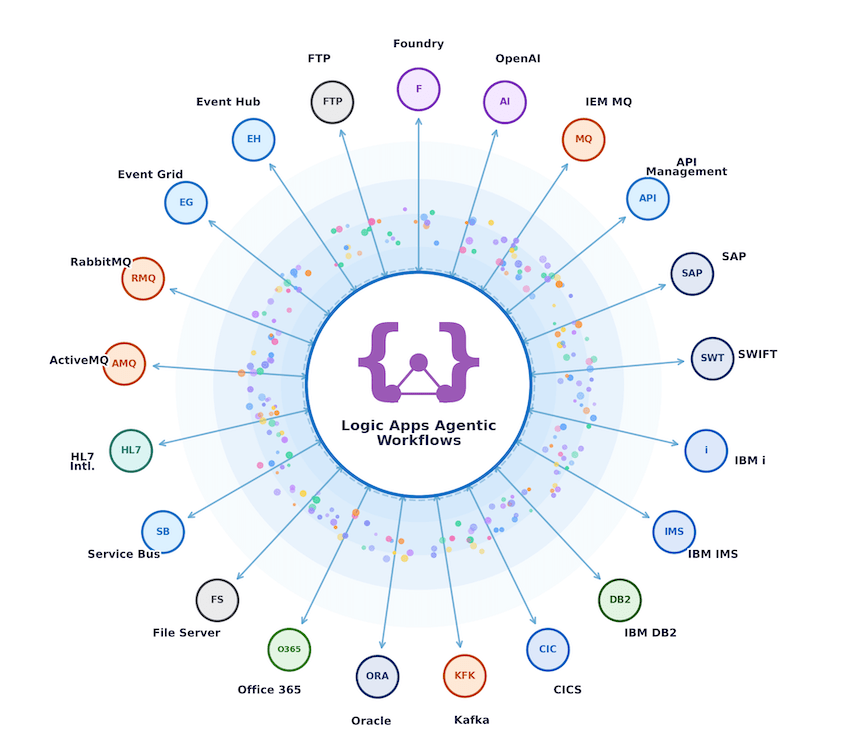
Worth keeping on your radar: Logic Apps’ 1,400+ managed connectors — SAP, Salesforce, Dynamics 365, ServiceNow, SQL, GitHub, and more — are available as first-class MCP tools inside Microsoft Foundry. Foundry agents can call these connectors without writing authentication boilerplate or API plumbing. This is the Foundry-side complement to the Logic Apps MCP wizard: the wizard exposes your workflows; Foundry exposes the connectors themselves. Together, every piece of enterprise connectivity in Logic Apps is AI-callable from Microsoft’s pro-code agent platform.
A2A + MCP in Copilot Studio: The Orchestration Layer Has Both Protocols Now
Copilot Studio now has both MCP (calling tools) and A2A (calling agents) in the same orchestration canvas. This is architecturally significant: a Copilot Studio agent can trigger a Logic Apps MCP tool for structured integration work, and separately delegate a sub-task to a Semantic Kernel agent or any A2A endpoint — all within a single conversation or automation. For integration practitioners advising on multi-agent projects, the question is now ‘when do I use MCP vs. A2A?’ — MCP for deterministic tool execution (APIs, queries, data writes), A2A for reasoning delegation where you want another agent’s judgement.
Microsoft Announcements and Updates
- Introducing Fireworks AI on Microsoft Foundry: Bringing high performance, low latency open model inference to Azure
- Modernizing regulated industries with cloud and agentic AI
- Many agents, one team: Scaling modernization on Azure
- Extend your coding agent with .NET Skills
Community Blog Posts
- Designing MCP tools for agents: Lessons from building Datadog’s MCP server by datadoghq
- EY hit 4x coding productivity by connecting AI agents to engineering standards by Emilia
- The 8 Levels of Agentic Engineering by Bassim
- The context problem: Why enterprise AI needs more than foundation models by Elra
- Modernize .NET Anywhere with GitHub Copilot by Mika
- MCP Servers in Copilot Studio – Connecting Azure API Management and Logic Apps by Mikko
- Driving continuous optimization: Turbo360 and the CAF manage phase by Michael
- You can use Named Values to centralize configuration in Azure API Management by Sandro
- 6 takeaways from our “Growing Up in the Digital Age” Summit by Mindy
Podcasts
- Even the chip makers are making LLMs by The Stack Overflow Podcast
- Avalonia 12 with Mike James & Matt Lacey by dotnetrocks
Video
- MCP Servers: Expose Your Logic Apps to AI | New Tooling by Stephen W Thomas
- Build AI Agents with Your Data for Under $10 a Month! by Microsoft
Microsoft Learn Paths
- Set Up Standard Workflows as MCP Servers — Azure Logic Apps The official Microsoft Learn documentation for configuring Logic Apps Standard as an MCP server
- AI Gateway Capabilities in Azure API Management Comprehensive reference for all GenAI Gateway capabilities now available in Azure API Management — token quotas, semantic caching, circuit breakers, backend load balancing, and content safety integration.
That’s it for this week. If you found this useful, consider forwarding it to a colleague who works with Microsoft Integration Stack.
Have a tip, use case, or tool worth sharing? Reply to this email — I read every one.
Until next week,
Gautam