Every week, I filter through everything Microsoft ships on Azure Logic Apps, AI Agents, API Management, Copilot Studio, and the broader Integration Platform — and surface only what working professionals actually need to know and act on. No press releases. No marketing fluff. Just the signal.
This week’s Signal – Gautam’s Take
The remaining reasons you couldn’t migrate from BizTalk to Logic Apps Standard are running out, fast.
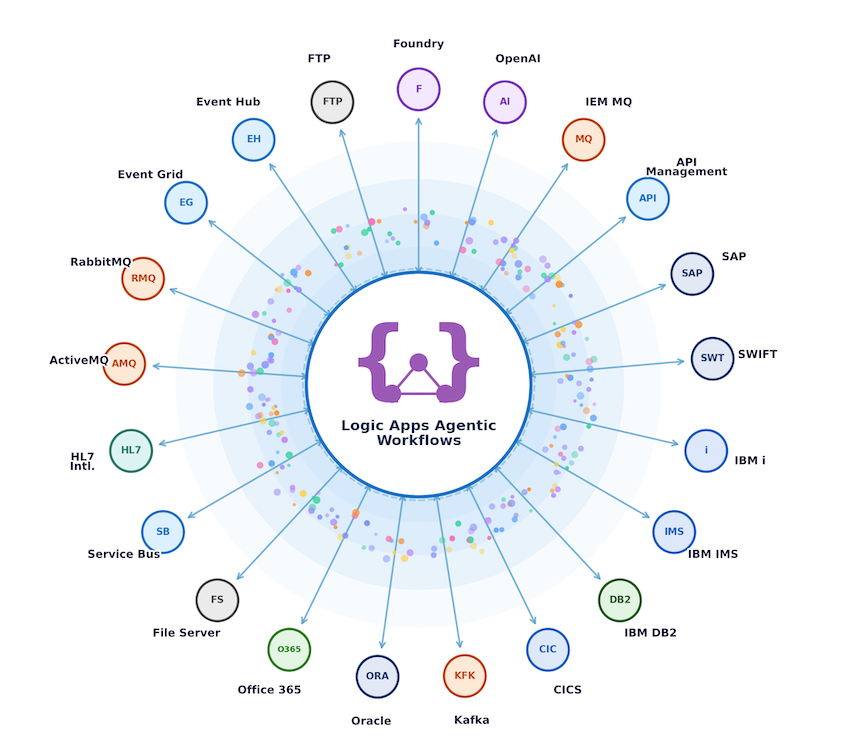
Harold Campos’s team published “Bringing all your Integration workloads to Logic Apps Standard” — which isn’t a blog post title so much as a product statement of intent. It covers the HL7/MLLP connector (healthcare message routing without BizTalk Healthcare Accelerator), the Rules Engine connector (BRE-compatible business rule evaluation in Standard), and MSMQ connector support. For teams who stalled their BizTalk migration because LOB connectors weren’t ready — that excuse is running out.
The same week, the Oracle Database built-in connector entered public preview for Logic Apps Standard — and the key word is built-in. No on-premises data gateway. No separately managed agent. Oracle connectivity runs in-process inside the Standard runtime, the same way SQL and Service Bus do. For BizTalk architects, that removes what has historically been the most common infrastructure objection to moving Oracle-dependent orchestrations to Logic Apps.
Together, these two announcements close a significant chunk of the remaining BizTalk parity gap. HL7, MLLP, MSMQ, BRE policies, Oracle stored procedures — if your migration project has been parked waiting on any of these, the blocker is now a preview connector away.
AI + Integration
Oracle Connectivity
The Oracle built-in connector represents a pattern shift, not just a connector add. Previously, connecting Logic Apps to Oracle required the on-premises data gateway — a separately deployed agent running in your network. That meant two things: infrastructure to provision and monitor, and a latency and reliability boundary between the Logic Apps runtime and the database tier. The built-in connector eliminates both. It runs inside the Logic Apps Standard worker process using the same execution context as the workflow — no network hop, no separate agent heartbeat to watch. For AI-assisted integration scenarios (agent workflows reading Oracle reference data, MCP tool definitions backed by stored procedures), this matters: you want the data access path to be as simple and low-latency as the rest of the workflow.
- Supported operations: Execute stored procedure, Get rows, Insert row, Delete row
- Connection: supports Oracle-managed (host/port/SID) and TNS connection strings
- Deployment model: runs in-process in Logic Apps Standard, no gateway required
- Authentication: managed identity support for Azure-hosted Oracle configurations
Source: Announcing Public Preview of Oracle Database Built-In Connector for Azure Logic Apps
Legacy Protocol Support – Hl7, MSMQ, and Rules engine
The HL7/MLLP connector addition is worth understanding at the protocol level. MLLP (Minimal Lower Layer Protocol) is the transport wrapper used by HL7 v2 messages — it’s what BizTalk’s HL7 Accelerator used to unwrap before routing. Logic Apps Standard can now receive and parse MLLP-framed HL7 messages directly, without BizTalk Healthcare Accelerator in the path. Combined with the existing EDI and AS2 support, Logic Apps Standard now covers the core B2B and healthcare message formats that kept many BizTalk installations alive.
The Rules Engine connector is the other significant item. Microsoft’s BizTalk Business Rules Engine (BRE) let teams externalize business logic into policies separate from orchestration code. The Logic Apps Rules Engine connector provides BRE-compatible policy evaluation — meaning existing rule sets can be imported and evaluated within Logic Apps Standard workflows without a rewrite. This closes the last major parity gap for teams who built policy-heavy BizTalk solutions.
- HL7/MLLP connector: receive and parse healthcare messages without BizTalk HA
- Rules Engine connector: BRE-compatible policy evaluation in Logic Apps Standard
- MSMQ connector: read/write to Microsoft Message Queue endpoints from Standard workflows
Source: Bringing All Your Integration Workloads to Logic Apps Standard
Microsoft Announcements and Updates
- Scaling cloud and AI: Microsoft Azure’s commitment to Europe’s digital futureazure.microsoft.com
- Azure IaaS: Defense in depth built on secure-by-design principlesazure.microsoft.com
- Bringing all your Integration workloads to Logic Apps Standardtechcommunity.microsoft.com
Community Blog Posts
- The “AI Job Apocalypse” Is a Complete Fantasyby David a16z.news
- Improving AI agents through better evaluationsby Matt infoworld.com
- Cursor’s $60 billion bet is on the harness, not the modelby Matthew thenewstack.io
- Agent Skillsby addyosmani addyosmani.com
- What you’re actually writing when you write a SKILL.mdby Lex internals.laxmena.com
- Agentic Coding is a Trapby larsfaye larsfaye.com
- 10 Lessons for Agentic Codingby dbreunig dbreunig.com
- Choosing between APIs, MCP, and Agent-to-Agent architecturesby Lak lakshmanok.medium.com
- Run multiple coding agents safely with git worktreesby Karl medium.com
- The AWS MCP Server is now generally availableby Sébastien Stormacq aws.amazon.com
- Coding with AI Agents is Now a Baseline Expectation for Managersby Daniel code.dblock.org
Podcasts
- .NET Nanoframework with José Simões by dotnetrocks
Video
- Building a Golf Course Booking Agent with Dataverse Plugin for coding agents + Copilot Studioby Kent Weare youtube.com
- How a Group of Developers Took Back Control from Enterprise Java | Spring: The DocumentarybyCultRepo youtube.com
Microsoft Learn Paths
- Set Up Standard Workflows as MCP Servers — Azure Logic AppsThe official Microsoft Learn documentation for configuring Logic Apps Standard as an MCP server learn.microsoft.com
- AI Gateway Capabilities in Azure API ManagementComprehensive reference for all GenAI Gateway capabilities now available in Azure API Management — token quotas, semantic caching, circuit breakers, backend load balancing, and content safety integration. learn.microsoft.com
- Migration approaches for BizTalk Server to Azure Logic AppsMigration approaches for BizTalk Server to Azure Logic Apps — Microsoft Learn reference covering assessment, pattern mapping, and toolchain selection including the new ODXtoWFMigrator. learn.microsoft.com
That’s it for this week. If you found this useful, consider forwarding it to a colleague who works with Microsoft Integration Stack.
Have a tip, use case, or tool worth sharing? Reply to this email — I read every one.
Until next week,
Gautam